Developing Third-party Algorithm Model
You can upload third-party algorithm models to X-BD, and manage, run and call the model with supOS object data on the platform.
Developing Algorithm Model
A model package should include a folder named backend containing a model algorithm file runtime.py and a dependency file requirements.text, and a model description file manifest.json.
runtime.py
- Only 3 entry arguments
- inputData: 2-dimensional array, corresponds to input variables.
- dataStruct: Defined data structure.
- config: Custom model configuration.
Must contain a whole process function defined as algorithmrun
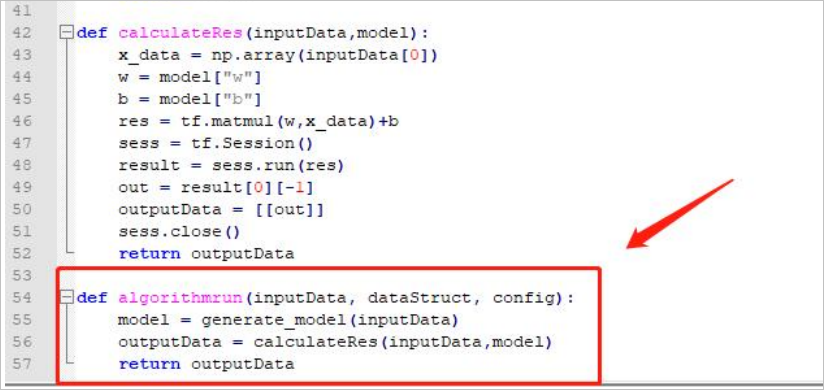
Only one return argument: outputdata.
info
If there are other referenced projects or model files, you can either reference in runtime.py or put them together with runtime.py in the same folder backend.
requirements.txt
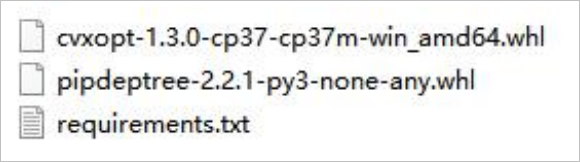
For the following dependencies, the requirements file content should be:
cvxopt==1.3.0
pipdeptree==2.2.1
manifest.json
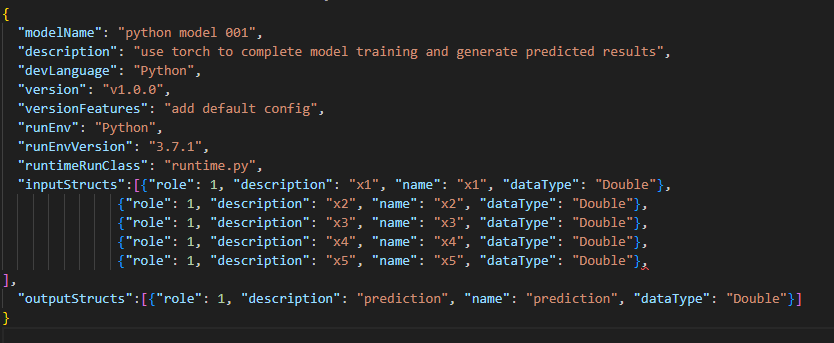
| Parameter | Description |
|---|---|
| modelName |
|
| description | Cannot exceed 500 in length. |
| devLanguage | Python |
| version | Must be unique. Required. |
| versionFeatures | Features of the current version. Cannot exceed 500 in length. |
| runEnv | Python. Required. |
| runEnvVersion | Python version: 3.7.1. Required. |
| runtimeRunClass | runtime.py. Required. |
| inputStructs | Input data structure. |
| outputStructs | Output data structure. |
| config | Custom configuration. |
Uploading Algorithm Model
- Log in to supOS, and then select Data Intelligence > Data Science > Model Management.
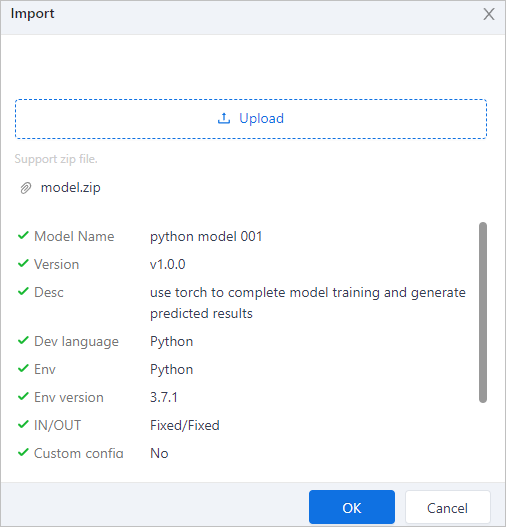
- Click Import model, select the model file from local and then click OK.